StarKey
StarKey is Supra’s wallet. A StarKey account holds a Move address and a SupraEVM address, and signs for both. To install StarKey and create an account, follow StarKey’s installation and Create an Account guides. Tokens walks through sending a transaction, with screenshots.
Your SUPRA on each side
Both addresses come from the same StarKey account, and so from the same seed phrase. The EVM address is not derived from the Move address or its key, because SupraMVM and SupraEVM use different key schemes. StarKey shows the SUPRA balance on each separately.
On both sides the token is SUPRA. It is one asset, held with 8 decimals on SupraMVM and 18 on SupraEVM; see Native currency. Moving it from one side to the other is a crossing; see Funding an account and Performing Cross-VM Transfers.
Adding Devnet
In StarKey, open All Networks, choose Add Network (+), set the network type to Ethereum, and enter:
| Field | Value |
|---|---|
| Network name | Supra Devnet (EVM) |
| RPC URL | https://rpc-devnet.supra.com/rpc/v1/eth/wallet_integration |
| Chain ID | 535600 |
| Currency symbol | SUPRA |
| Decimals | 18 |
| Block explorer | https://devnet.suprascan.io |
Use the wallet-integration endpoint, not /rpc/v1/eth. A wallet sends block parameters that
/rpc/v1/eth refuses; see
The wallet-integration endpoint.
Exporting a private key
Foundry, Hardhat and other tools sign with a private key rather than through the wallet. To use a StarKey account’s EVM address with them:
- In StarKey, open Settings.
- Go to Security → Recovery phrase & keys.
- Select Private Key, and enter your password to reveal it.
- Copy the Ethereum private key.
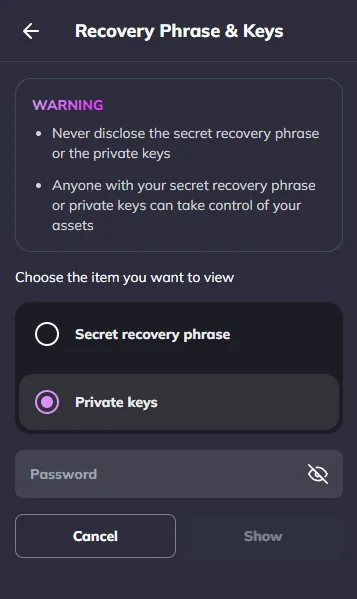
Import the key into the tool’s encrypted keystore rather than writing it into a configuration file:
cast wallet import for Foundry, npx hardhat keystore set for Hardhat.
Anyone holding the private key controls the account’s EVM address and its funds on every EVM network. Use a separate account for Devnet.
After a Devnet reset
A Devnet reset keeps the chain ID but destroys everything held in chain state:
- Balances on both sides are gone. Take SUPRA from the faucet again and cross it.
- The account’s nonce restarts at zero.
- Contracts a dapp stored the address of, and tokens added to StarKey by address, may no longer hold code. Redeploy them and add them again.
- Activity from before the reset can no longer be read from the node or the explorer.
Devnet is served by several nodes behind a load balancer; see
Load balancer. If a wallet’s connection moves to another
node while a transaction is pending, the next nonce read from pending can repeat one already
used. Wait for each transaction’s receipt before sending the next from the same account.
Connecting a dapp
StarKey injects two providers: window.starkey.supra for Move transactions and
window.starkey.ethereum, an EIP-1193 provider, for SupraEVM transactions. A dapp that already
works with MetaMask works with StarKey’s EVM provider without changes. StarKey’s
Ethereum & EVM Networks guide covers the provider in full.
Connect, then ask the wallet to switch to Devnet, adding it if it does not have it:
const provider = window.starkey?.ethereum

const SUPRA_DEVNET = {
  chainId: '0x82c30', // 535600
  chainName: 'Supra Devnet (EVM)',
  nativeCurrency: { name: 'SUPRA', symbol: 'SUPRA', decimals: 18 },
  rpcUrls: ['https://rpc-devnet.supra.com/rpc/v1/eth/wallet_integration'],
  blockExplorerUrls: ['https://devnet.suprascan.io'],
}

async function connect() {
  const [account] = await provider.request({ method: 'eth_requestAccounts' })
  try {
    await provider.request({
      method: 'wallet_switchEthereumChain',
      params: [{ chainId: SUPRA_DEVNET.chainId }],
    })
  } catch (err) {
    if (err.code !== 4902) throw err // 4902: StarKey does not have the chain yet
    await provider.request({
      method: 'wallet_addEthereumChain',
      params: [SUPRA_DEVNET],
    })
  }
  return account
}
With viem, wrap the same provider in a wallet client:
import { createWalletClient, custom, defineChain } from 'viem'

export const supraDevnet = defineChain({
  id: 535600,
  name: 'Supra Devnet (EVM)',
  nativeCurrency: { name: 'SUPRA', symbol: 'SUPRA', decimals: 18 },
  rpcUrls: { default: { http: ['https://rpc-devnet.supra.com/rpc/v1/eth/wallet_integration'] } },
  blockExplorers: { default: { name: 'SupraScan', url: 'https://devnet.suprascan.io' } },
})

const wallet = createWalletClient({
  chain: supraDevnet,
  transport: custom(window.starkey.ethereum),
})
A dapp’s own read-only client, which needs no wallet, can use /rpc/v1/eth instead.
Setting fees from a dapp
A dapp that sets its own gasPrice or maxFeePerGas must offer at least
the gas price floor. A transaction below it is refused
at submission, after the user has approved it in the wallet. A maxPriorityFeePerGas of 0 is
admitted; a non-zero one is charged and burnt with the rest of the fee.